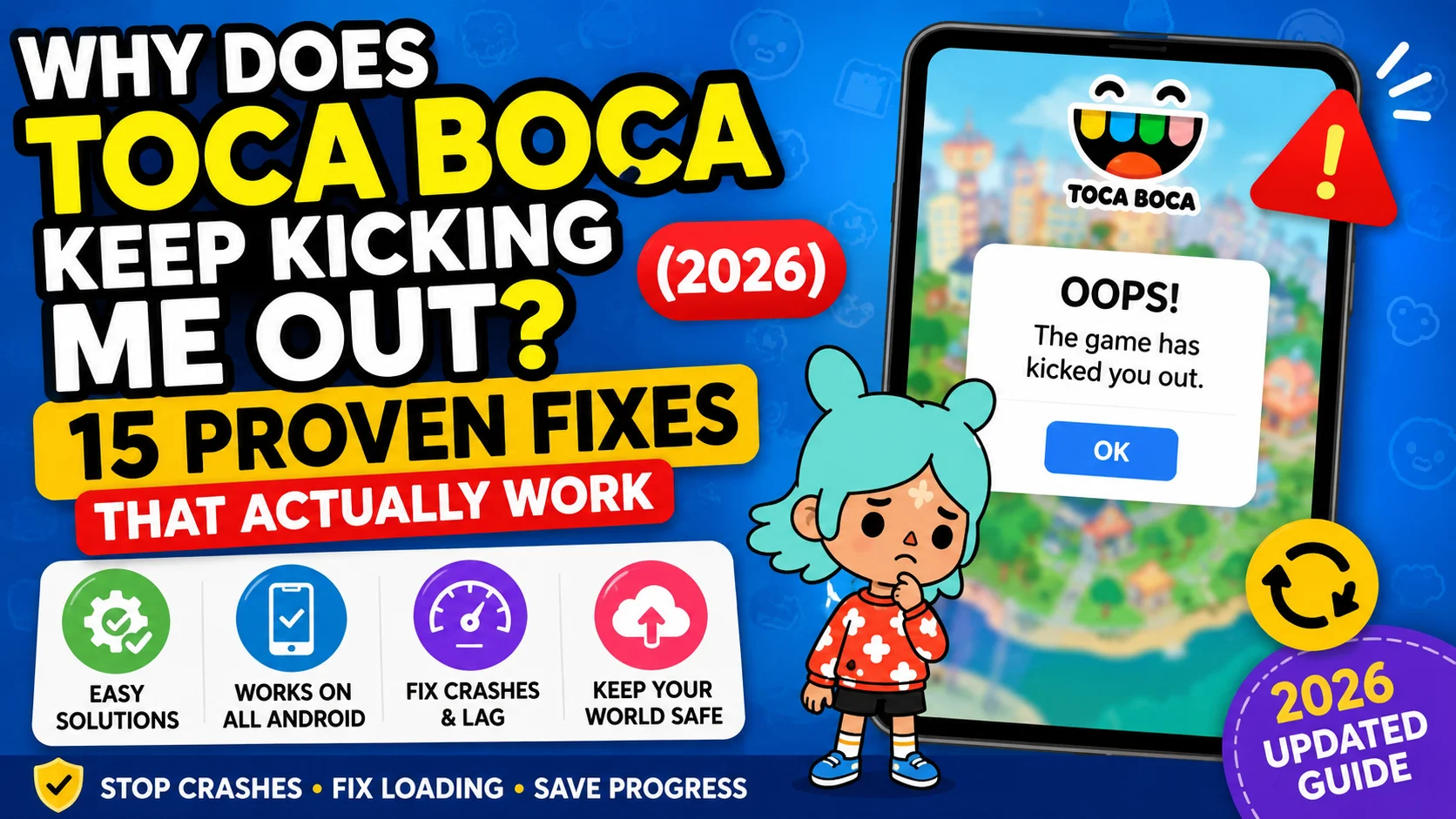
If you’re playing Toca Boca World and the game suddenly kicks you out, just know you’re not alone.
“Why Does Toca Boca Keep Kicking Me Out?” has become one of the most common complaints I see from parents in 2026. My son and I have dealt with this frustration so many times, especially right after big updates. It’s really annoying when you’re in the middle of something fun and the game just boots you out without warning.
The truth is, Toca Boca World is a huge game with tons of interactive items and locations. When it gets overloaded, it kicks players out to prevent a total crash. Here are the main reasons this keeps happening these days.
1. Overloaded Houses & Too Many Items
This is by far the #1 cause in 2026. When you put hundreds (or thousands) of items in one house — especially in Midtown Apartments — the game struggles to load everything. It often results in sudden kicks or crashes. Many parents on Reddit report that their game was stable until they added too much furniture or decorations in one location.
2.Not Exiting Locations Properly
A very common mistake. If you just close the app instead of using the orange door to exit a location, the game doesn’t save properly. This often leads to kicking out on the next login.
I learned this the hard way after losing progress several times.
3.Low Storage & Device Performance
If your phone or tablet has less than 2 GB free storage, or if it’s an older/low-RAM device, Toca Boca will kick you out frequently. The game is quite heavy, especially with many character packs unlocked.
4.Outdated Game or Mod Version
Using an old version of the game or an outdated mod is another major reason. Toca Boca releases fixes almost every month. If you’re on an old version, you’re much more likely to get kicked out.
5.iOS vs Android Specific Issues
iPad users (especially older iPads) report more kicking issues after the June 2026 update. Android users usually face problems when using modded versions or when storage is nearly full.
6. Is It a Game Bug or Your Device?
One of the first questions most players ask is: when exactly did the crashing start? That timing usually gives us a really good clue about what’s causing it.
If Toca Boca World only started crashing right after a new update, it’s probably just a bug the developers introduced. Big updates can be a bit messy, and they often fix those issues in the next patch.
However, in case it has been going on for weeks, or if it is happening only on your phone, the reason is most probably in the phone itself – lack of space, lack of memory, or inability to handle the game effectively.
It’s easiest to determine this by asking yourself a few questions:
- Did the crashes begin immediately after you downloaded the newest version of the game?
- Is it always crashed when opened, or only in certain geographical areas?
- Do you feel that your phone works slowly even when used for other applications?
- Are you running low on storage space?
Your answers can help you zero in on the real issue before you start trying more complicated fixes.
Community Insight
There have been many complaints from players regarding the same problem on public platforms such as Reddit and Google Play. It has been mentioned that the game used to crash unexpectedly, particularly when players tried to open ornate houses. Some people have said that they
did not experience this problem after updating their game again.
From the experiences mentioned above, it is clear that crashes could be caused by software issues and even device limitations.
Can You Fix It Without Reinstalling?
Absolutely—but not in all cases, most times.
Most gamers think that reinstalling the game is the only way out, but it shouldn’t be your last resort. In case there is no backup for your game, you might end up losing your customized character, decorated house, and everything else.
Before considering a fresh installation, try these simple steps:
✔ Restart your device.
✔ Update Toca Boca World to the latest version.
✔ Clear the app cache.
✔ Free up at least 2–3 GB of storage.
✔ Close apps running in the background.
✔ Restart the game after making these changes.
These quick fixes solve the problem for many players and take only a few minutes to complete.
Key Point
If Toca Boca World continues to kick you out of the game, do not worry. Most times, there is usually something that is wrong with the software bugs or the memory space in your device.
Begin from the simplest methods and ensure that you only reinstall the game when absolutely necessary. A number of minor adjustments could help you regain access to your world without having to lose all your characters and narratives.
Signs Your Toca Boca World Is About to Crash
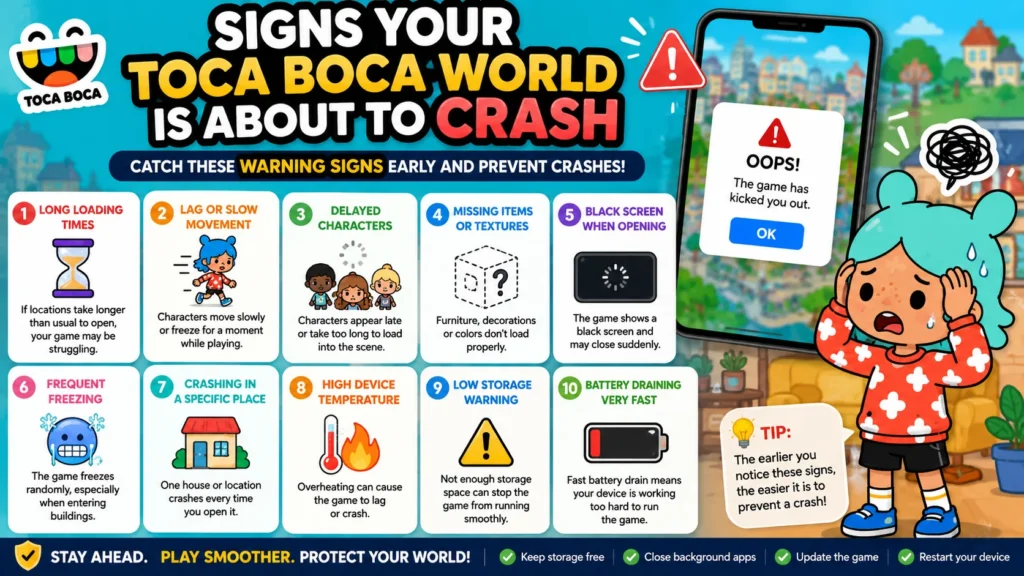
Many of the players believe that a game crash occurs unexpectedly. However, it is not necessarily true in most situations. In case of Toca Boca World, you will be able to receive warning signs prior to the crash or freeze. Understanding them and learning how to recognize the warning signs will assist you in saving your progress.
This fact is based on my experience while assisting parents in troubleshooting the application. Many of them claim that “The game worked perfectly yesterday but now keeps crashing”. Upon conducting a couple of inquiries, one may find out that they have noticed some problems like increased loading time of characters or slower performance.
In case you notice any of the signs listed below, it is necessary to pause the game and check your device before proceeding.
Game Closes Suddenly
This is one of the most frequent issues reported by players.
While you are decorating your house, designing your character, or moving to some other location, the game shuts down abruptly without displaying any warning message.
It may occur just once or even twice, but if it begins occurring frequently, there is certainly something wrong.
Common Reasons
- Low available RAM.
- Too many apps running in the background.
- Outdated game version.
- Temporary software bug.
- Device overheating.
What You Should Do
✔ Close all background apps.
✔ Restart your phone or tablet.
✔ Update the game if a newer version is available.
✔ Wait a few minutes if your device feels hot.
Many players notice that random crashes become less frequent after simply restarting their device.
Stuck on the Loading Screen
Another common warning sign is when the loading screen never finishes.
Instead of entering your world, the loading bar freezes or keeps spinning for several minutes.
This usually happens after:
- A major game update.
- Corrupted cache files.
- Low storage.
- Interrupted downloads
Quick Fixes
✔ Check your internet connection if the game is loading new content.
✔ Restart the game.
✔ Clear temporary cache files.
✔ Make sure you have enough free storage.
If the loading screen keeps getting stuck after an update, it’s often worth waiting a day or two for a bug-fix patch before trying more advanced solutions.
Black Screen After Opening
The following is the situation for some of the users where the game can start but rather than showing the main menu there is only black screen displayed. This problem may seem serious but doesn’t mean that your save data is gone.
Possible Reasons
- Graphics failed to load.
- The game didn’t start correctly.
- Device compatibility issue.
- Corrupted temporary files.
Try These Steps
✔ Force close the game.
✔ Restart your device.
✔ Install the latest update.
✔ Check whether your Android version is supported.
In many cases, the game opens normally after a restart.
Characters Not Loading
Have you ever entered your favorite house only to discover that everyone has disappeared?
This is another warning sign that something isn’t loading correctly.
Characters may:
- Appear after a long delay.
- Load without clothes.
- Stand completely still.
- Fail to appear at all.
Why It Happens
- The data is still loading.
- Device memory is running low.
- Too many characters are placed in one location.
- Temporary game bug.
Helpful Tip
Instead of creating hundreds of characters in a single house, try spreading them across different locations. This reduces the amount of information the game has to load at one time.
Houses Fail to Open
Large houses filled with furniture, decorations, pets, and characters can sometimes become difficult to load.
Players often notice this problem after months of decorating one location.
The house may:
- Freeze while opening.
- Return to the world map.
- Close the game completely.
Community Insight
There is a piece of advice from many experienced gamers in the gaming community that one should try to avoid overcrowded houses. Many people have mentioned that splitting their collection of items into several houses works better than keeping everything in one.
It does not necessarily mean that one has to take away their favorite decorations—they just need to be organized better.
Game Freezes Before Closing
Sometimes the game doesn’t crash immediately.
Instead, you’ll notice:
- Characters stop moving.
- Music continues but nothing responds.
- Buttons stop working.
- Animations freeze.
- The screen becomes unresponsive.
A few seconds later, the game closes by itself.
This usually means the game has run out of available memory and can no longer continue normally.
What Usually Helps
✔ Close background applications.
✔ Restart your device.
✔ Free up storage.
✔ Reduce very large builds with hundreds of decorative objects.
✔ Update the game.
A Real Situation
One player shared on Reddit that their game only crashed when entering a large shopping mall they had been decorating for months. Every other location worked perfectly.
Instead of deleting the entire world, they removed some decorative items, split their characters into different buildings, and restarted the game. After that, the mall loaded properly again.
This type of experience is very common in public gaming sites and proves that there is usually a correlation between crashes and huge areas within a game.
Warning Signs You Shouldn’t Ignore
When you notice these issues at the same time, it’s recommended to find out why it’s happening before you move forward:
- Frequent freezing.
- Long loading times.
- Characters disappearing.
- Black screens.
- Houses refusing to load.
- Random crashes every few minutes.
All these symptoms are generally noticed before other major issues occur.
It will be easier for you to prevent losing progress.
Key Point
The majority of the problems experienced during gameplay on Toca Boca World come with warning signs. Such problems include slow loading time, freezing, black screen, character disappearance, and too many people in the location.
It is important to detect such symptoms in good time for one to rectify them. In the following sections, we will discuss the causes and solutions for these problems.
Why Does Toca Boca Keep Kicking Me Out? (Top Causes)
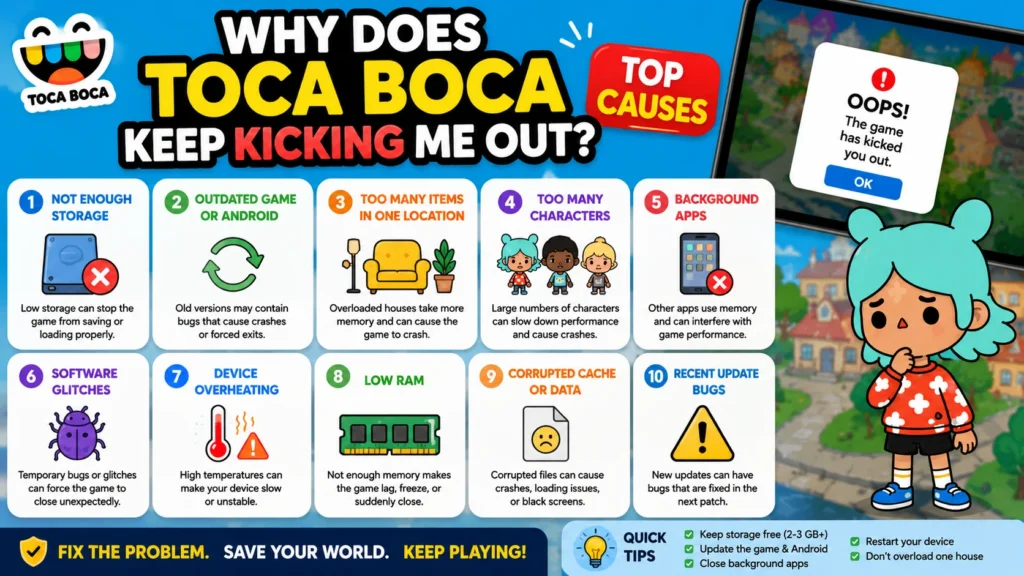
If you’ve already tried restarting the game and Toca Boca World is still crashing, it’s time to dig into the real reasons behind it.
A lot of players assume it’s a problem with the game itself. But in most cases, crashes happen for a few common reasons — sometimes it’s a bug from a recent update, but often it’s something on your device like low storage, not enough memory, or outdated software.
After checking recent player reports and troubleshooting cases, I’ve seen that most crashes fall into just a few categories. Once you figure out which one matches your situation, fixing it gets a lot easier.
Let’s go through the most common causes one by one.
Outdated Game Version
One of the most frequent and simple explanations for why your Toca Boca World app crashes all the time is because you use the older version of this application.
The developers constantly provide new updates to eliminate errors, boost performance, and bring something fresh for users. Being on an outdated version, you will start experiencing conflicts with new Android updates, and the game becomes unstable.
For instance, after some significant updates in recent years, many users began reporting that their outdated versions crashed endlessly until they updated their games.
Signs You’re Using an Outdated Version
- Frequent crashes after launching the game.
- Missing new features.
- Characters or locations not loading correctly.
- Compatibility issues after updating Android.
What You Should Do
✔ Check if a newer version is available.
✔ Read the update notes before installing.
✔ Restart the game after updating.
Keeping your game updated is one of the easiest ways to avoid unexpected crashes.
Android System Compatibility Issues
The fact that your app is totally up-to-date won’t stop your Android from being important.
Each and every upgrade to the Android software changes something regarding the way how applications use storage, memory, and permissions. Some older devices fail to properly perform a recent version of a game, while a fresh upgrade of an Android may create compatibility problems until the developers come up with a solution.
There’s nothing wrong with your phone.
You May Notice
- The game closes shortly after opening.
- Loading takes much longer than before.
- Performance becomes slower after updating Android.
Recommended Solution
✔ Install the latest Android security updates.
✔ Restart your device after major system updates.
✔ Check whether your device meets the recommended system requirements.
Not Enough Free Storage
Storage issues are likely the most ignored cause of crashes in games.
It is often thought that if the game is already installed on your device, storage capacity does not matter anymore. However, it is important to remember that Toca Boca World continually creates temporary files when saving progress, accessing places and installing updates.
Low storage can cause the game to run improperly.
Community Insight
One of the first tips offered by seasoned gamers is to always have 2–3 GB of free space. Many users claim that they feel a significant boost after clearing unnecessary applications, pictures, and even some video clips.
How to Do It
- Go to the Storage menu on your mobile device.
- Find out how much free space you have left.
- Delete unnecessary files if you have little free space left.
Those few minutes spent can save you from several hours of trouble.
Corrupted Cache Files
The files will most of the times increase performance. But after a major upgrade or installation failure, cache files may end up getting corrupted.
This may result in the game:
- Freezing when loading.
- Crashing without warning.
- Showing a black screen.
- Failing to load some locations.
Good News
The cache cleaning will not delete any permanent files.
It will not generally remove your saved world or character unless your version supports backup.
A lot of gamers have resolved their problems related to the game crashing randomly by clearing the cache of the application and then restarting the game.
Too Many Items in One House
This is one thing that I keep seeing in forums and communities related to gaming.
It is very simple to decorate one whole house to perfection within weeks with all rooms filled with furniture, pets, gifts, foods, clothes, and characters.
The problem with this approach is that it takes a lot of memory.
Real Example
One gamer noted on Reddit that a certain apartment used to crash the game whenever it was entered, whereas everything else loaded flawlessly. Rather than deleting the entire world, he put some furniture in the surrounding houses and cut down on decorations. The apartment would now load fine whenever the game was restarted.
Simple Prevention Tips
✔ Spread decorations across multiple houses.
✔ Avoid placing hundreds of loose items in one room.
✔ Store seasonal decorations in separate buildings.
Your world can still look beautiful without putting unnecessary pressure on your device
Background Apps Using RAM
Toca Boca World is not the only application that uses up memory on your phone.
Other apps like music, browsers, messaging, recording screen, and social media apps all have their share in using your phone’s memory space.
If there are a lot of applications running at once, there might not be enough memory left for the game.
Signs
- Slow loading.
- Lag while moving characters.
- Random freezing.
- Game closes after several minutes.
Easy Fix
Before opening Toca Boca World:
✔ Close unused apps.
✔ Restart your phone if it has been running for many hours.
This simple habit often improves performance immediately.
Bug After a Major Update
Every large update brings exciting features—but sometimes unexpected bugs as well.
This isn’t unique to Toca Boca World. Nearly every popular mobile game experiences occasional issues after major releases.
Players sometimes report:
- Frequent crashes.
- Missing characters.
- Houses refusing to load.
- Increased loading times.
Fortunately, developers usually release smaller patches soon afterward to fix these problems.
Practical Advice
If crashes begin immediately after updating, avoid making major changes to your world until the next maintenance update becomes available.
Waiting a day or two can often save you unnecessary troubleshooting.
Corrupted Save Data
Although it’s less common, save files can occasionally become damaged.
This may happen if:
- The game closes while saving.
- The battery dies unexpectedly.
- Storage becomes completely full.
- The game is interrupted during an update.
Warning Signs
- Missing characters.
- Empty houses.
- Lost progress.
- Loading errors.
If cloud backup or another supported backup method is available, restoring your latest backup is usually the safest solution.
Device Overheating
Mobile games consume vast amounts of processing resources, particularly when played for long periods.
Your Android phone may automatically lower performance levels in case it gets too warm.
This often leads to games freezing or shutting down unexpectedly.
Reduce Overheating
✔ Remove thick phone cases while gaming if appropriate.
✔ Avoid charging and gaming at the same time.
✔ Take short breaks during long sessions.
✔ Keep your device out of direct sunlight.
A cooler device usually performs much better.
Unsupported APK Version
The stability will vary according to the particular version of the APK you have installed when not downloading from an official app store.
Different APKs are not always upgraded at the same time. Some APK versions may be built on older versions or may not yet be compatible with new Android versions.
This does not necessarily make it the culprit in all cases; however, installing a version suited for your Android device will increase stability.
Before installing any APK build, check that:
- It’s based on the latest available game version.
- It’s compatible with your Android version.
- The installation completed successfully.
Using an outdated or incompatible build can sometimes lead to crashes, missing content, or loading problems.
Case Study: How One Simple Change Solved Constant Crashes
A mother mentioned in a forum discussion on a video game that when her 9-year-old daughter would enter the house they had been building for many months in the game, the game would crash immediately.
They believed initially that the update had messed up the game.
Without reinstalling everything, they tried the following three things:
- Updated the game to the latest version.
- Cleared the cache.
- Moved hundreds of decorative items into two additional houses.
The result?
The crashes stopped, and none of their characters or custom designs were lost.
While every situation is different, this example shows why it’s worth checking the simple causes before trying drastic solutions.
What Players Commonly Say Online
Across Reddit, Google Play reviews, and gaming communities, several themes appear repeatedly:
- “The game crashes after decorating one huge house.”
- “Freeing storage made it run much faster.”
- “The latest update fixed my loading problem.”
- “Restarting my phone solved random crashes.”
Although every device behaves differently, these recurring experiences suggest that storage, updates, and overloaded locations are among the most common causes of crashes.
Key Point :
If Toca Boca World keeps kicking you out, the problem usually isn’t caused by just one thing. It’s often a combination of software updates, device performance, storage, and how much content your world contains.
Luckily, all of these problems can be detected and rectified without having to begin from scratch. Once you have uncovered the true root of the problem, then coming up with a proper solution will be easy—this is what we shall discuss in the following section.
Fix Toca Boca Crashing After the Latest Update
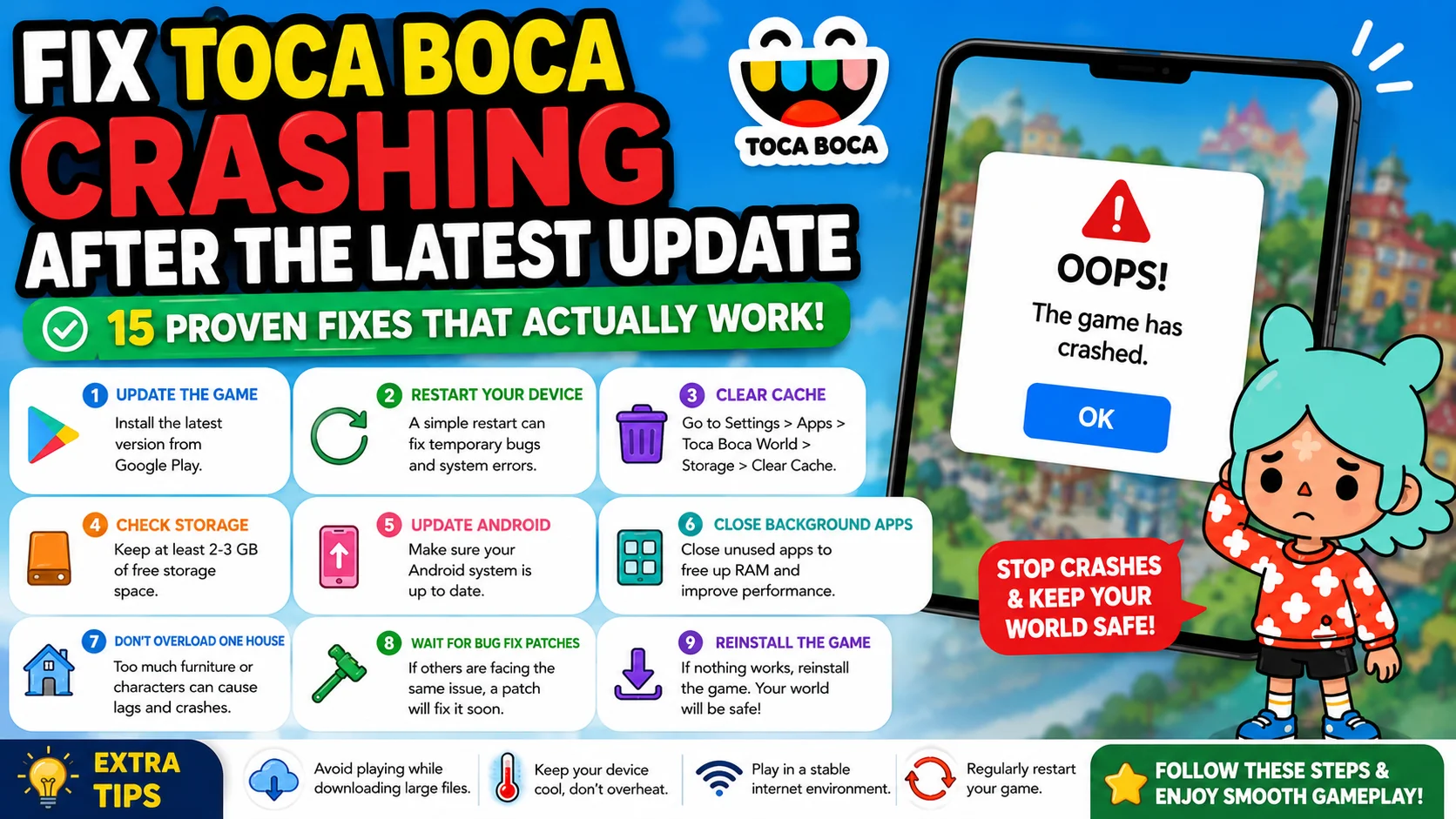
If you updated Toca Boca World recently and now the game keeps crashing, kicking you out, showing a black screen, or simply refusing to load, trust me — you’re not the only one dealing with this. The June 2026 update (version 1.132.1 / 1.132.2) brought some exciting new stuff like Olivia Rodrigo songs and Pride celebration gifts, but it also introduced new crashing problems for many players. In this section, I’ll walk you through the most common issues people are facing after this update and share the practical fixes that have actually worked for real parents — including myself
Why Toca Boca Keeps Crashing After Update
The newest update added more content and improved some features, but it also increased the game’s memory usage.
Many players noticed more crashes, especially when entering big custom houses or switching between locations quickly. Older devices and modded versions are affected the most.
Quick Fixes for Crashing Right After Update
Try these steps in order:
- Restart your phone or tablet completely.
- Clear the game cache (Android only — don’t clear data).
- Use the orange door to exit every location properly before closing the game.
- Make sure you have at least 2 GB of free storage.
Many parents reported that simply restarting the device after the update solved the crashing issue immediately.
Toca Boca Black Screen or Loading Problem After Update
A black screen or endless loading is very common after big updates. This usually happens because the game is trying to load new content but gets stuck. Solutions:
- Free up more storage space.
- Update to the newest available version (1.132.2 as of now).
- Try playing a small, simple location first instead of jumping into a heavily decorated house.
On iOS devices, offload the app and reinstall it.
Toca Boca won’t open after the latest update
If the game won’t even open after updating, try these:
- Restart your device.
- Clear cache again.
- Reinstall the game (for official version, restore purchases after reinstalling).
- For mod users, download a fresh updated mod version.
Long-Term Fix – Best Practices After Updates
To avoid future crashing problems:
- Wait 1–2 days after a major update before playing heavily.
- Don’t overload houses with too many items.
- Keep your device storage clean.
- Update to the latest stable version as soon as possible.
Device-Specific Solutions For Toca Boca APK
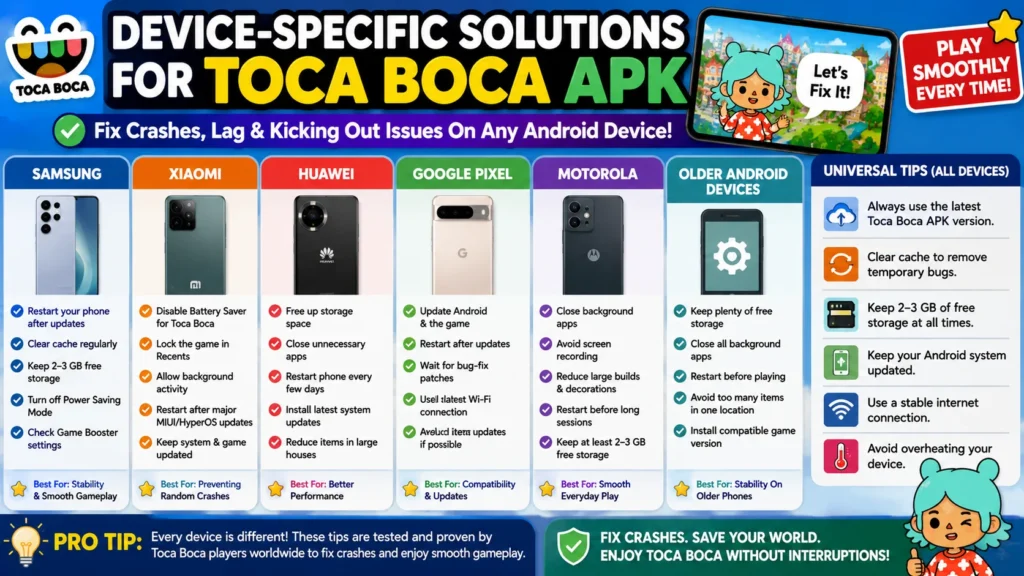
Each Android phone deals with Toca Boca World differently.
While one player will have no problems with the game on an old phone from three years ago, the other one may experience issues with it on a new phone. The reason for that lies in the fact that each phone brand has its own hardware, memory, and software.
In the course of a year, I have found out about one frequent problem that users tend to blame on Toca Boca World itself, when in fact the problem might be associated with some device settings.
Here are the best solutions for you depending on your Android device.
Samsung Galaxy Phones
Samsung devices generally run Toca Boca World very well, but some users experience random crashes after major Android or One UI updates.
Common Problems:
- Game closes while loading.
- Lag after playing for 20–30 minutes.
- Houses take longer to open.
- Characters disappear temporarily.
How to Fix It
✔ Restart your phone after installing updates.
✔ Clear the game cache regularly.
✔ Keep at least 2–3 GB of free storage.
✔ Turn off Power Saving Mode while playing.
✔ Close Samsung Game Booster’s background optimization if it’s affecting performance.
Xiaomi Devices
Xiaomi devices have good hardware, but the MIUI and HyperOS come with battery optimizations that might cause unexpected closures of the game when it is running in the background.
Common Problems
- Game closes without warning.
- Slow loading after minimizing the app.
- Progress doesn’t save correctly if the game is forced to close.
Recommended Fixes
✔ Disable Battery Saver for Toca Boca World.
✔ Lock the game in Recent Apps if your device supports it.
✔ Keep background activity enabled.
✔ Restart the device after major software updates.
Huawei Phone
Huawei users may experience slightly different issues depending on their device model and software version.
Common Problems
- Longer loading times.
- Performance drops after extended gameplay.
- Random freezing in large locations.
Helpful Solutions
✔ Free additional storage before playing.
✔ Close unnecessary apps.
✔ Restart the phone every few days.
✔ Install the latest available system updates.
Older Huawei devices with limited RAM may benefit from reducing the number of heavily decorated houses in the game.
Google Pixel Phones
Google Pixel devices usually receive Android updates before other brands.
While this is great for security, it also means Pixel users sometimes encounter compatibility issues before optimization patches are released for certain games.
If You’re Using a Pixel
✔ Update both Android and the game.
✔ Restart after installing updates.
✔ Wait for bug-fix patches if crashes begin immediately after a major Android release.
Fortunately, these issues are usually temporary.
Motorola Devices
Motorola phones give you an excellent experience on Android, but those models which come with less RAM may have some difficulties with large map
Common Symptoms
- Slow loading.
- Frame drops.
- Game freezing
- Random crashes
Best Practices
✔ Keep background apps closed.
✔ Avoid recording your screen while playing.
✔ Reduce extremely large builds.
✔ Restart the phone before long gaming sessions.
These simple habits often improve performance on budget-friendly devices.
Older Android Phones
Parents often approach me to inquire if their old phones can run Toca Boca World.
Yes, but not at unrealistic levels.
For phones that have been in use for a few years now, updates that incorporate more locations and animations will definitely need more processing power than previous updates.
You May Notice
- Longer loading screens.
- Lower frame rates.
- Delayed character movement.
- Occasional crashes.
How to Improve Performance
✔ Keep plenty of free storage.
✔ Close all background applications.
✔ Restart your phone before playing.
✔ Avoid filling one location with hundreds of decorative items.
✔ Install only compatible game updates for your Android version.
Even older phones can provide a good experience when they’re properly maintained.
Which Devices Usually Perform Best?
Based on recent player feedback across public communities, devices with:
- 6 GB RAM or more
- Modern processors
- Regular Android updates
- Sufficient free storage
generally experience fewer crashes than older devices with limited memory.
However, hardware isn’t the only factor.
A well-maintained phone with enough storage and regular updates often performs better than a powerful phone that’s almost completely full.
Case Study: Two Different Phones, Two Different Results
A parent shared an interesting experience in an Android gaming forum.
Her two children played Toca Boca World on different phones.
The newer Samsung device worked smoothly, while the older Motorola phone crashed every time they visited a heavily decorated shopping mall.
Instead of blaming the game, she tried several simple fixes:
- Deleted unused apps.
- Freed almost 4 GB of storage.
- Restarted the phone.
- Moved hundreds of furniture items into separate buildings.
After making those changes, the older phone still wasn’t as fast as the Samsung device—but it became stable enough for everyday play.
This shows that device maintenance can make a noticeable difference, even on older hardware.
What Players Commonly Say
Across Reddit, Google Play reviews, and Android gaming discussions, several themes appear repeatedly:
“Samsung runs much smoother after clearing cache.”
“Turning off battery optimization fixed it on my Xiaomi.”
“My older phone works better after freeing storage.”
“The crashes stopped after the latest Android update.”
These aren’t guaranteed fixes for every device, but they reflect the most common solutions shared by players with similar problems.
Quick Device Checklist
Before playing Toca Boca World, make sure you have:
✅ The latest game version installed.
✅ The latest Android update available for your phone.
✅ At least 2–3 GB of free storage.
✅ Background apps closed.
✅ Battery Saver disabled during gameplay.
✅ A freshly restarted device if you’ve been using it for many hours.
Following this checklist can prevent many device-related crashes before they happen.